Returning players: recover before registering again
Open your known operator route and inspect the final address. During our October 9, 2026 check, sneket.com forwarded to sneket.net/main. If your browser takes you somewhere unfamiliar, establish the destination before entering the password.
A rejected password is a reason to check keyboard input and saved credentials, then use the operator’s recovery tool. It is not a reason to hand your password to a person offering help. Use the email associated with the original account and keep recovery messages private.
If the entire page fails to load, read the site access checklist first. An address or connection problem must be resolved before you can evaluate the login result. Do not keep trying credentials on a series of unknown mirror pages.
New players: a fast signup still needs a recovery plan
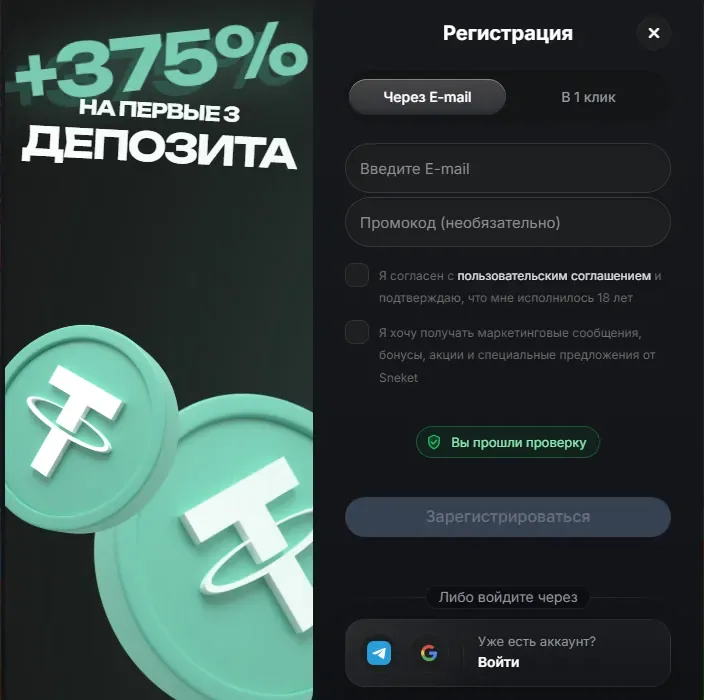
The registration screen checked on October 9 displayed email and one-click options, together with an 18+ notice. This confirms what was visible on that date; it does not establish that every method will be available to every visitor later.
Choose an option that lets you maintain access. If a one-click flow issues credentials, save them securely and check how an email address is added or confirmed. Fast registration should not be interpreted as an exemption from subsequent checks.
Section 8.10 of Sneket’s published rules connects withdrawal processing with a confirmed email, completed checks and fulfilled playthrough. Having access to the account screen is therefore only one part of preparing to request a payment.
Use a password that is different from the one protecting your email. If the operator asks for verification, use its designated account process. This website cannot verify documents, approve an account or act as the casino’s support service.
- Inspect the final destination before signing in.
- Keep control of the email associated with registration.
- Store credentials securely rather than in a public message.
- Read the selected promotion before authorising a deposit.
- Use operator tools for recovery and verification.
Separate account creation from offer activation
The checked signup screen advertised +375% across the first three deposits. Creating an account does not prove that the whole package has been credited or that a promotion is active. Read the Sneket bonus guide before choosing an offer.
A promo-code field does not mean that a code is always mandatory. No working public code was verified in our check. If an offer requires one, establish the source and terms rather than copying an unverified string from a search result.
Inspect the payment methods shown in your own account. The rules contain a general deposit minimum, but individual routes have their own limits. Also read the deposit playthrough requirement: declining a bonus should not be assumed to remove every condition governing the use of deposited funds.
Make an account enquiry specific
If recovery fails, note the registration email, the time and the exact error. Give the operator enough detail to identify the problem without putting your password or one-time code in the message. For a payment enquiry, preserve the transaction reference and request status.
Check the spam folder and sender details of recovery messages. Follow any waiting period shown by the interface instead of issuing repeated requests. If the email account itself is inaccessible, recovery of that email may need to come first.
The rules review explains requirements relevant to withdrawals. For a broader overview, return to the Sneket Casino guide. Neither a new signup nor a different address substitutes for a clear answer about an existing account.
Questions about Sneket
Where should I enter my Sneket password?
Only in the operator’s own login flow after checking the destination. This informational site has no account form.
Was one-click registration available?
A one-click option was visible during the October 9, 2026 check. It does not confirm that later checks or email confirmation can be skipped.
What if the recovery email does not arrive?
Check the registration email, spam folder and any waiting period shown. Use an established operator channel if the issue continues.
Does registration activate the full welcome offer?
Do not assume so. Read the selected promotion’s activation rules, deposit stages and restrictions before paying.
Continue to the casino website
Check the selected offer, cashier limits and availability in your country before depositing.
Ad: we may earn commission if you register through this affiliate link. It opens an external site in a new tab.